The Internet TESL
Journal
chompjp [at] mac.com
Ritsumeikan University (Tokyo, Japan)
Creating a Writing Course Utilizing Class and Student Blogs
Andrew Johnsonchompjp [at] mac.com
Ritsumeikan University (Tokyo, Japan)
Weblogs, or blogs for short, were
created as a tool for people to create online journals without the need
of any programming experience or knowledge. Although not
originally intended for use in EFL classes, blogs have immense
potential as an extremely valuable tool for the teaching of second
language writing. By utilizing free blogging services on the
Internet, teachers are capable of creating and storing online
supplemental materials for students, post class notes for student
review, and give general feedback to the class as a whole and
individually. Additionally, students are able to submit
assignments online. Taught in a computer room with Internet
access, a writing class utilizing blogs that allows students to
actually write in class on a computer can be created. The
objectives of this paper are 1) to show other teachers how to set up a
course using blogs at ‘Blogger' (a free blogging service) and 2) to
discuss the advantages of blogs for both teachers and students.
The ideas presented are based on a graduate level science writing
course taught in the spring of 2003.
Introduction
Weblogs (or blogs) are electronic journals that allow the user to keep records of their writing on a website (Figure 1). In recent years, the use of these electronic journals in education is on the rise, especially in the United States. A good example is the Bay Area Writing Project which has organized the Educational Blogger Network (edBlogNet) with the purpose of helping kindergarten through university teachers “use weblog technology for the teaching of writing and reading across the disciplines” (eBn, 2003). Blogs have been successfully implemented into journalism, political science, and various junior high to university English writing courses for native English speakers. However, the use of blogs in teaching EFL appears to still be in its infancy but has much potential, especially in teaching written communication skills. Campbell (2003) goes into various ways blogs can be used by teachers and students to communicate in an EFL environment. He suggests using class blogs as a forum for students to express opinions, ideas, and interesting information. Additionally, the use of a ‘tutor blog' is a way for teachers to share with students and point them to other interesting links. Duber (2002) also discusses the background of blogs and gives links to several teachers' ‘tutor blogs.' Although the number of articles discussing blogs in an EFL teaching setting has increased recently, few of them discuss group or team blogs that keep student submissions private between the individual student and the teacher.
Figure 1: An example of a student's blog.
The best way to illustrate the use of blogs in the classroom is by showing how to set up and administer a collection of class and student blogs. Since there are several articles that describe various blogging services with their various functions (Hiler, 2000), this article will not get into that topic but rather discuss creating blogs at ‘Blogger' (located at www.blogger.com) in order to give a concrete example.
Setting up a Blog-Based Writing Class
The majority of the ideas presented in this paper were implemented in a graduate level scientific writing course taught in the spring of 2003. The ideas that were not implemented are from verbal student feedback pertaining to methods of improving the class structure.Intended Audience for this Section
Blogs are a versatile tool with numerous applications. The ideas presented in this paper are intended for teachers that meet two conditions. First, the teacher can obtain a computer lab with Internet access and each student will have a computer to use. Secondly, the description presented is intended for teachers who have a) limited or no HTML experience and b) no access to Internet server space. If one has HTML experience and server space, a few more options for creating the class are available that fall beyond the scope of this paper.Features of the Blog-Based Class
Before choosing a blogging service, one must know what will be required of it. The following is a list containing the features this author felt would be necessary for a successful blog-based class:- It must be possible for a teacher to create as many “class blogs” as deemed necessary to organize class materials. For example, it must be possible for a teacher to create a blog for class notes and another for posting group feedback (Figure 2).
- The class blogs must be viewable by all students. Furthermore, only the teacher should have administrative privileges to modify these blogs.
- Students must all have their own individual blog for posting assignments. Only two people, the teacher and the student, can view the student's individual blog. Students can edit their own writing and the teacher can add comments to the students' submissions. However, students cannot edit the teacher's comments.
- For the sake of organization, it must be simple for the teacher to change between students' blogs.
- The blogging service must provide server space on the Internet to store class and student blogs.
- The blogging service must be free.
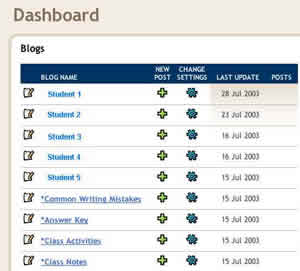 ;
;Figure 2: Blogger's “dashboard” is where all the blogs one is associated with are listed.
Setting Up Class and Student Blogs at Blogger
As shown in Figure 3, an account and blog can be made in three steps. For those without an account, a username and password must be created in the first step. Continuing along the process, the next step is to enter a title and URL for the new blog (Figure 4). The last step is to choose a template to determine font, color and layout of the blog when viewed as a webpage.
Figure 3: The blog creation process as shown on the welcome page of www.blogger.com
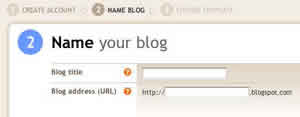
Figure 4: In Step 2 of creating a blog, the blog title and URL is entered.
Creation of the class blogs should be done before the first class and assigned relevant blog titles and URLs that communicate the purpose of the blog. For example, a blog of class notes should be titled “class notes.” By creating separate class blogs, information can be efficiently organized. For example, one class blog can be solely for keeping lecture-based material. Another blog can be kept solely for giving group feedback to the class. In this way, students can easily find pertinent information. Other possible class blogs are student assignment instructions, vocabulary, and answers to past assignments. The teacher created class blogs can be used as an example when introducing the concept of blogs to the students.
The creation of all the student blogs can be done on the first day of class. After introducing the class and the class blogs, give students a non-blog related activity and have them come up to the teacher computer one at a time to create their student blog. From the teacher's account, begin the process to create a new blog as previously described. In the first step, enter the student's name as the blog title and have the student enter a name for their URL address. To keep the student blog private, this URL address should not be shared with anyone. Next, quickly have the student choose a template, which can be changed at anytime, for the layout of their blog. After a few moments to process and create the blog, one is ready to start adding to it (Figure 5). However, since the blog was created on the teacher's account, students to do have access to it yet. Adding the students as members to the blogs is the final, most important step in setting up the student blogs. In the ‘settings' menu of each of your blogs, there is a ‘members' option. Here, group members can be added to the blogs via the ‘add team member' button. Following the instructions, have students type their email address in one of the ‘new user' fields and click the ‘save settings' button (Figure 6). There is also space to attach a message with the invitation. After all the students have completed this process, instruct them to check their email. They should all find an invitation from Blogger with a link to follow to join the student-teacher blog. If the students do not have an existing Blogger account, they will need to do so at this point and create a username and password. After the students accept the invitations to join their blogs, the initial set up is complete.
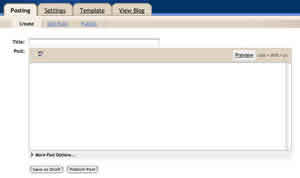
Figure 5: Adding an entry to a blog
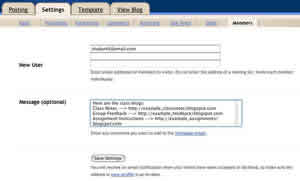
Figure 6: Adding a group member to a blog
The Blogger layout can appear confusing at first glance, but actually it is quite simple to navigate and use, especially after the May 9, 2004 design change. Blogger contains a comprehensive help section to aid users. For this reason, only a few points regarding Blogger use and navigation will not be discussed here. After logging in from the main page, www.blogger.com, users are taken to what Blogger refers to as the “dashboard.” In the case of the teacher, all the class blogs and all of the student-teacher group blogs are shown (Figure 2). In the student's case, just the student-teacher group blog is shown. Also, it is important to tell students that when adding or editing a post, it will not be saved until the ‘publish post' button is clicked. Students must be taught the importance of this step or they will lose their work.
Viewing the Teacher Blogs
The teacher created class blogs act just like any other website. Teachers must share the URL of these blogs, decided in the blog creation process (Figure 4), for students to have access to them. An easy way to do this is to create a message to the students containing all the information regarding the class blogs and paste it into the message section of the invitation to join the student blog (Figure 6). It is recommended that students bookmark these URL addresses on their computer.Advantages of Blogs to Teachers
- The use of blogs is a supplemental aid to the teacher. The amount of time students use their weblogs is at the discretion of the teacher. Students can use it once a semester to submit a paper, weekly for class assignments and notes, or anything in between.
- Computers in the classroom are not a prerequisite for the use of blogs. Thanks to the affordability of today's computers and high speed Internet access, most students have Internet access at home. Many universities have computer classrooms and computer areas for students to access now.
- All of the teacher's notes will be viewable together in chronological order. This is very convenient when preparing lessons that build upon previous material taught in the class.
- It is simple to edit class material if the text can be improved or if something new needs to be added.
- All student writing samples are kept in one place and can be read from any computer connected to the Internet at anytime.
- Teachers can give collective feedback to the class when a recurring mistake is found by adding entries to a “Writing Feedback” class blog. Additionally, individual feedback can be given to individual student blogs.
- In order to save time when giving feedback, save a copy of the messages at an additional teacher-only blog. If a class is taught for several years with different students, teachers might be able to recycle these messages. From this blog, the teacher can select the appropriate message to send to a student regarding their feedback to their homework and writing samples.
Advantages of Blogs to Students
- Students have access to your complete notes on the Internet. Students have the option of previewing the class material before class and reviewing the material after class.
- Because students are connected to the Internet, they have access to online English dictionaries. Students can easily look up words they do not understand by cutting the unknown word and pasting it into an online dictionary.
- Because the class material is organized into sections, students can easily find information.
- Students can read comments for the class as a whole and comments directed at them individually. This maximizes feedback and contact with the teacher.
- Students can observe how their writing has changed over time.
Grading
Many teachers might be hesitant to have students submit online assignments because it is difficult to make comments and corrections. However, it is possible to create a color code system of correction. When correcting student assignments, the teacher can quickly alter the color of particular mistakes by using 2 simple HTML commands surrounding the text to alter:<font color=“red”> student mistake </font>.
When viewed as a webpage, instead of seeing the HTML code, the color of the text will have been changed. By simply changing the color to blue, green, brown, orange, etc., different types of mistakes can be indicated. Students, by using a key, can then learn the nature of their errors based on the color of the text. A detailed explanation of this correction system, as well as student feedback regarding it, are beyond the scope of this paper and will be discussed in a future one.
Conclusion
When students graduate from university and begin their careers, the bulk of their writing will not be done with pencil and paper, but rather on a word processor. Therefore, writing classes ought to be set in realistic environment utilizing the writing aids of a computer. Since most universities have computer labs with Internet access, writing teachers can easily create classes utilizing blogs that allow students the chance to write and submit assignments in class. Combined with essential discussion and lecture from the teacher, the utilization of both class and student blogs can effectively maximize student access to class materials and exposure to teacher feedback. As teachers continue to experiment and share their ideas for various applications of blogs for teaching EFL, the number of blog applications can be expected to increase dramatically.References
- Campbell, A. P. (2003, February). Weblogs for use with ESL classes. The Internet TESL Journal, Vol. IX, No. 2. from http://iteslj.org/Techniques/Campbell-Weblogs.html
- Duber, J. (2002, September). Mad blogs and englishmen. TESL-EJ, Vol. 6. No. 2. from http://www.kyoto-su.ac.jp/information/tesl-ej/ej22/int.html
- eBn – the Educational Blogger Network. (2003, February 5). Bay Area Writing Project News. from http://www.bayareawritingproject.org/bawpNews/2003/02/05
- Hiler, J. (2002, July 22). The microcontent news blogging software roundup:
- Part one of the weblog industry report. Microcontent News. from http://www.microcontentnews.com/articles/blogware.htm
The Internet TESL Journal, Vol. X, No. 8, August 2004
http://iteslj.org/
http://iteslj.org/Techniques/Johnson-Blogs/